By Michael | Last Updated
The article tells you how to simultaneously show the calendar of your own country and the calendar of Hijri/Gregorian/Umm al-Qura/Hebrew Lunar/Saka Era in the Calendar on Windows 10 computer.
Step 1: Turn on Calendar in the Start Menu.
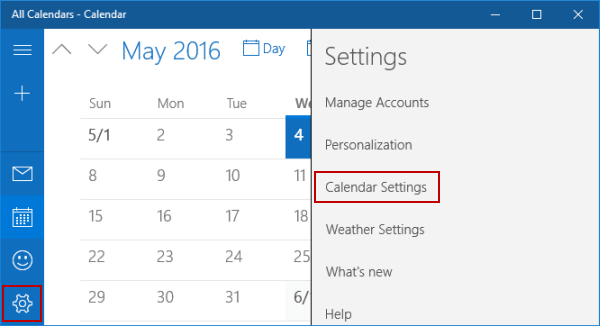
Step 2: Click the lower-left Settings button, and tap Calendar Settings in the items.

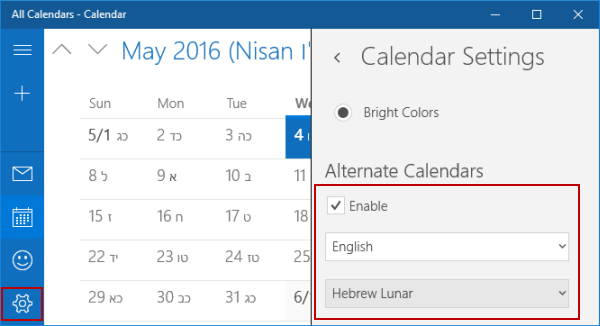
Step 3: Under Alternate Calendars, check the box before Enable, select the calendar of your country, and choose Gregorian/Hijri/Umm al-Qura/Hebrew Lunar/Saka Era.

Related Articles:
How to Reset Windows 10 Forgotten Password
How to Bypass Windows 10 Password Login with/without Password
Easy Guide to Reset Windows 10 Admin Password Like an Expert
4 Tips to Change Windows 10 Password without Knowing Current Password
Can't Sign into Microsoft Account Windows 10 | Account Locked/Blocked