We use cookies for personalizing content and ads and providing social media features. Your usage information on our website will be used for social media, advertising, and traffic analytics, or shared with our partners. Clicking "Accept" means you agree to use our cookies .
Location spoofing in Pokémon GO allows players to change their in-game location without physically traveling. This makes it possible to catch region-exclusive Pokémon, participate in global events, and access high-density PokéStops from anywhere. However, spoofing also comes with risks—Niantic actively monitors abnormal behavior, and careless spoofing can result in soft bans, strikes, or permanent account suspension.
The good news? If done carefully and correctly, you can spoof in Pokémon GO with minimal ban risk. This guide explains how spoofing works, which methods are safer, and what rules you must follow to avoid detection.
Is it Possible to Spoof in Pokémon GO Without Getting Banned?
Technically, any form of spoofing violates Pokémon GO's Terms of Service, meaning there is always some level of risk. However, many players spoof for long periods without bans by: using realistic movement patterns; respecting cooldown times, avoiding modded game apps; using trusted GPS spoofing tools.
The key is to spoof like a real human traveler, not like a teleporting robot.
Best Practices to Spoof Pokémon GO Safely
Before using any spoofing tool, follow these essential spoofing rules to reduce ban risks:
1. Always Follow Pokémon GO Cooldown Rules
Cooldown time refers to how long you must wait before interacting with the game after changing locations. Ignoring cooldowns is the first reason players get soft-banned.
For example, after walking 1 or 2 km, you need to wait 1 or 2 minutes; after traveling 10 km, just wait 10 or 15 minutes; after teleporting across countries, wait up to 2 hours.
During cooldown, do not: Catch Pokémon; Spin PokéStops; Battle gyms or raids.
2. Avoid Modded Pokémon GO Apps
Apps like modified Pokémon GO APKs or cracked versions are high-risk. Niantic can easily detect altered game files. It is recommended to use the official Pokémon GO app combined with an external GPS spoofing tool.
3. Don't Jump Between Distant Locations Too Fast
Teleporting from New York to Tokyo multiple times a day is unrealistic and suspicious. Stick to: One main city per session; Gradual location changes; Realistic travel patterns. Just think like a traveler, not a teleporter.
How to Spoof in Pokémon GO on iOS (Safest Way)
It is recommended to use a PC-based GPS spoofing tool to achieve this aim with no jailbreak, which is the safest option for iOS users because they do not modify game files. iSunshare AnyLoca is one of the reliable GPS spoofing tools which can help to spoof location in Pokémon GO without getting banned. It supports all models of iPhone.
iSunshare Reliable iOS Location Spoofer
No jailbreak required.
Cooldown timer makes the movement more realistic.
Safety without risk in account suspension.
Location changes look system-level, not app-level.
Step 1: Install this trusted GPS location spoofer on your computer. Then connect your iPhone via USB.
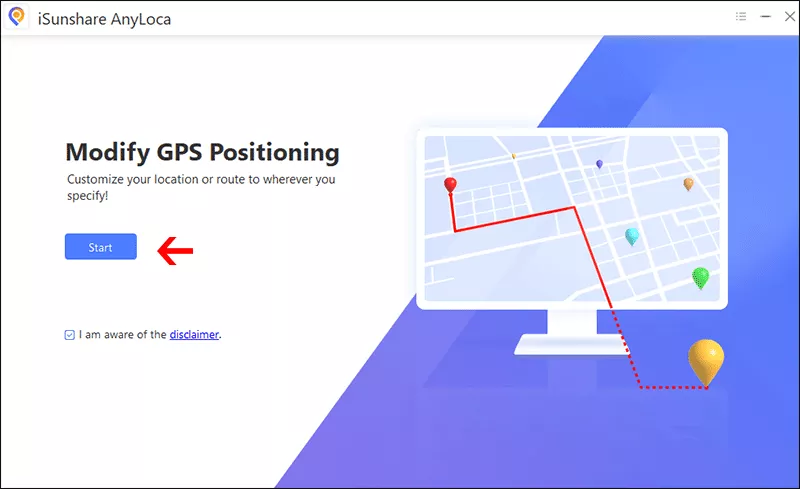
Step 2: Open AnyLoca and click Start from the main interface.
Step 3: Choose your iPhone and click the Next button to proceed.
Step 4: Select the Joystick movement from the map. After that, you can set the speed and direction to move.
How to Spoof in Pokémon GO on Android Safely
Android offers more flexibility but also more risk if done incorrectly. You can select a GPS spoofing app, such as PGSharp, to finish it with no root.
This method works but may be less stable on newer Android versions.
Step 1: Enable developer option. Then set a GPS spoofing app as the mock location provider
Step 2: Choose a realistic location and open Pokémon GO.
Safe Spoofing Tips Most Players Ignore
You want to know what not to do when spoofing Pokémon GO? Here are the answers:
Don't spoof while driving at high speed
Don't teleport during active events excessively
Don't use multiple spoofing apps at once
Use walking speed (6–9 km/h)
Make breaks between sessions
Use one account per device
FAQs on Spoofing in Pokémon GO
1. Will Pokémon GO ban you for spoofing?
Yes, if you do not follow the spoof rules. Soft bans usually occur when players ignore cooldown times. You may see Pokémon flee instantly or be unable to spin PokéStops.
2. How long do you get banned for spoofing Pokémon GO?
Soft ban: A few minutes to several hours
First strike: 7-day warning
Second strike: 30-day suspension
Third strike: Permanent ban
3. Is teleporting riskier than walking with a joystick?
Yes. Teleporting long distances frequently is more suspicious. Simulated walking with realistic speed is generally safer.
Conclusions
Spoofing in Pokémon GO without getting banned requires discipline, patience, and realism. By using safe GPS spoofing tools, respecting cooldown rules, avoiding modded apps, and mimicking real-world movement, you can significantly reduce your risk of detection.
Remember: spoof smart, play slow, and never rush teleporting. If you treat spoofing like real travel, Niantic is far less likely to notice.