We use cookies for personalizing content and ads and providing social media features. Your usage information on our website will be used for social media, advertising, and traffic analytics, or shared with our partners. Clicking "Accept" means you agree to use our cookies .
If you want to hide your location on iPhone without anyone knowing, there are several discreet ways to do so. Whether it's for privacy, personal boundaries, or simply to take a break from location sharing, you can easily mask your whereabouts on your device. Below are some methods that will help you hide your location without alerting the person you're sharing it with.
There are several reasons why you might want to hide your location on iPhone:
Privacy: You may want to stop sharing your movements with others.
Personal Boundaries: Sometimes, people may track your location too frequently, and you need some space.
Preventing Over-Tracking: Apps like Find My or social media platforms track your location by default. Hiding it can prevent unwanted surveillance.
Managing Safety: If you feel like your location is being used to track or monitor you, masking your location helps you regain control.
Let's dive into the most effective ways to hide your location discreetly on your iPhone.
Part 2: Hide Your Location on iPhone by Turning it Off
Way 1: Disable Share My Location in Find My App
The Find My app is typically where people share their location, and turning off location sharing there is one of the easiest ways to hide your location. The best part is, you can do it without notifying anyone.
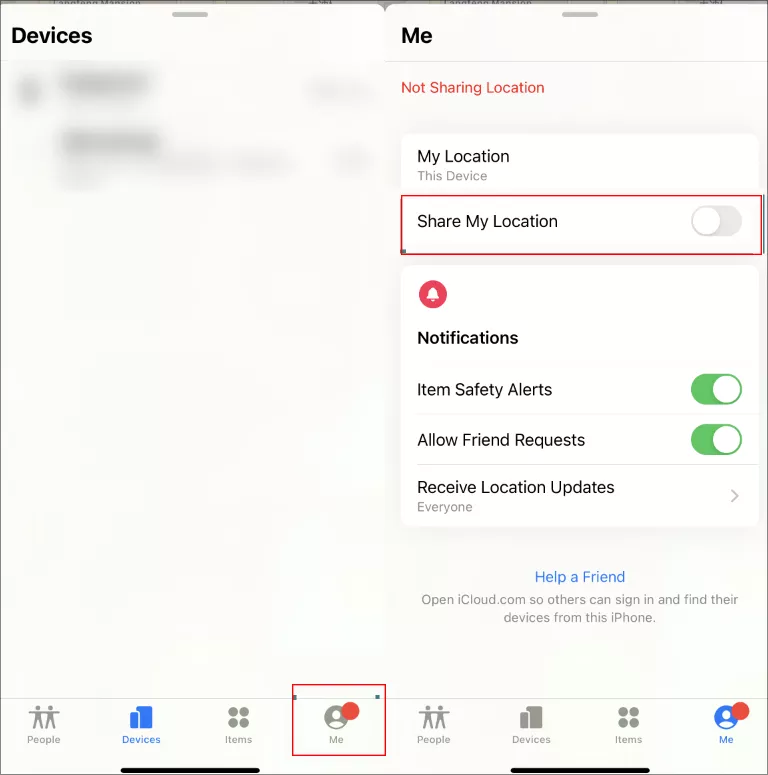
Step 1: Open the Find My app on your iPhone. Make sure the Find My app is signed in with your Apple ID account.
Step 2: Tap on the Me option on the lower right side of the iPhone screen.
Step 3: Tap the switch of Share My Location option to make it off.
If you want to stop someone from your contacts from knowing your location, you can tap People and select the person you do not want to share location. After that, tap Don't share or Stop Sharing My Location.
Way 2: Enable Airplane Mode to Temporarily Hide Your Location
If you need a quick way to stop sharing your location, Airplane Mode can work wonders. This disables all wireless communication on your phone, including GPS and network signals, which prevent your location from being tracked.
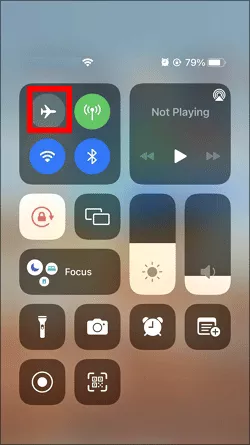
How to do it? Just swipe down from the top-right corner (for iPhone X and newer) or swipe up from the bottom (for older models), then tap the Airplane Mode icon to enable it. After that, others cannot view your location and the apps will not update your location. Will other people know you hide the location in this way? No, they just simply notice that your location is no longer available.
Note:
Airplane Mode also disables Wi-Fi and cellular data, so you won't be able to use apps or receive calls until you turn it off again.
Way 3. Disable Location Services for Specific Apps
If you only want to stop sharing your location with specific apps or contacts, you can manage Location Services on an app-by-app basis. This allows you to hide your location for certain apps like Find My, Snapchat, or WhatsApp, without turning it off for all apps.
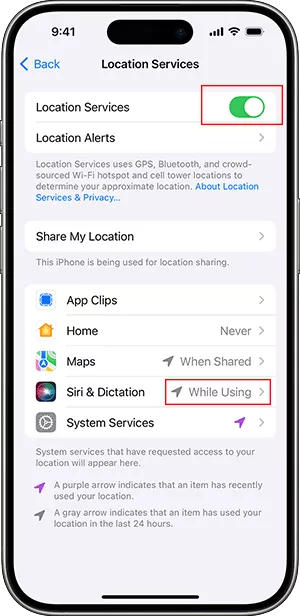
Step 1: Open the Settings app. Scroll down and tap Privacy &Security or Privacy in some iOS versions.
Step 2: Tap Location Services. Select the app for which you want to disable location sharing.
Step 3: Change the location permission to Never or While Using the App instead of Always. In no time, the app will no longer track or share your location, but it will not alert the person you're sharing with. If the app tries to access your location, it will be blocked or restricted.
If you're looking for a more comprehensive solution, you can turn off Location Services entirely in Step 2. This will prevent all apps from accessing your GPS data.
Part 3: Hide Your Location on iPhone without Turning it Off
Does it possible to turn on location without the other person know? Yes, you can use a fake location instead of the real one. If you need to completely hide your actual location and make it appear as if you're somewhere else, you can use a location spoofing app. iSunshare AnyLoca is one of such apps which let you change your GPS coordinates, allowing you to simulate being in another place entirely.
iSunshare Reliable iOS Location Spoofer
Easily hide iphone location without notifying.
Quickly stop sharing location without turning off location service.
Instantly change iPhone location without anyone knowing.
Step 1: Download and Install the location-spoofing app—AnyLoca on your computer. At the same time, make sure your iPhone is connected successfully to the computer.
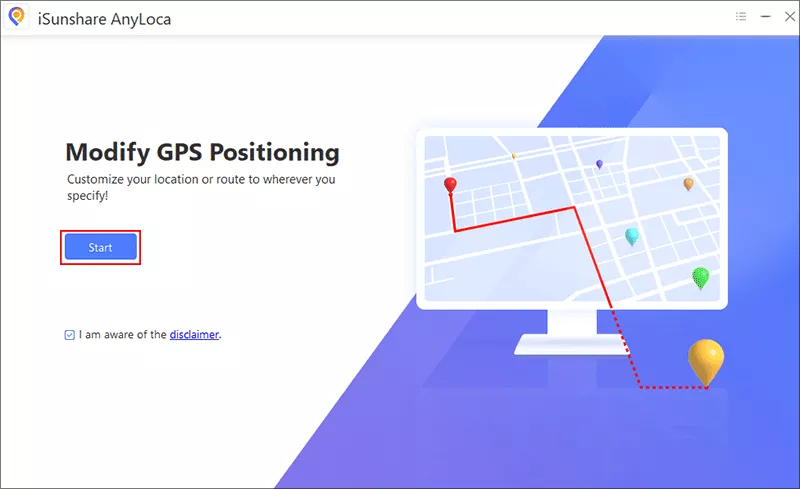
Step 2:Open AnyLoca and hit the Start button. In the coming interface, click the Next button to proceed.
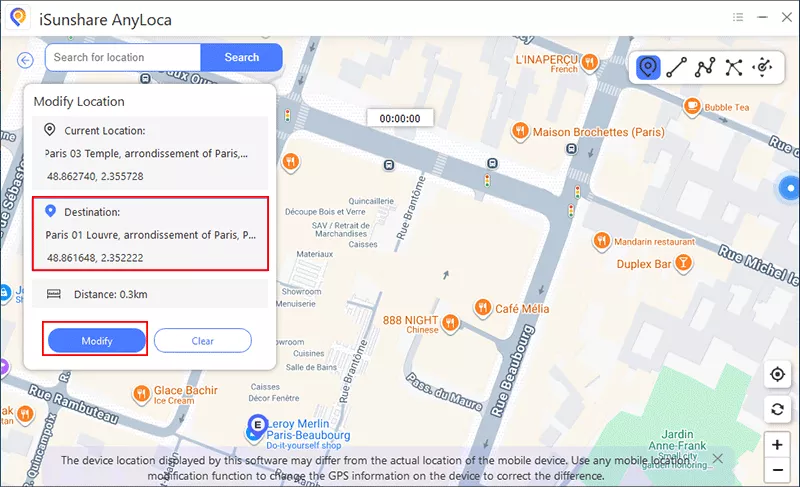
Step 3: choose a fake location on the map as your destination location. Finally, click the Modify button to apply the fake location.
After that, your iPhone will display the new, fake location. The person you're sharing your location with will see the fake location instead of your actual one. It is indeed a smart way to hide your iPhone location without anyone knowing.
Part 4: FAQs on Hiding Your Location on iPhone
1. Will anyone know if I turn off my location?
No, the person you're sharing your location with will not be notified if you stop sharing it. However, they will notice that your location is no longer available or being updated.
2. Can I hide my location temporarily?
Yes, you can use Airplane Mode to temporarily hide your location. This method is effective and does not notify the person you're sharing your location with.
3. Is it possible to hide my location without unsharing my location?
Yes, using a location-spoofing app like iSunshare AnyLoca allows you to change your iPhone's GPS location to a fake one. This is useful for hiding your actual location and showing a different one.
Conclusions
If you're looking to hide your location on iPhone without anyone knowing, you have several options to maintain your privacy. From turning off Share My Location in Find My to using Airplane Mode or even location spoofing apps, there are methods to prevent others from tracking your movements discreetly. Be sure to choose the method that best fits your needs, whether it's a temporary break or a more permanent solution.