We use cookies for personalizing content and ads and providing social media features. Your usage information on our website will be used for social media, advertising, and traffic analytics, or shared with our partners. Clicking "Accept" means you agree to use our cookies .
Pokémon GO encourages players to get active by walking to hatch eggs. But what if you want to hatch eggs without physically walking? Whether due to weather, health issues, or lack of time, sometimes you may need to hatch eggs while staying at home or in one place. Fortunately, there are safe and reliable methods to do so!
In this guide, we'll walk you through how to hatch eggs in Pokémon GO without walking, using simple tricks and tools to simulate movement, and we'll also discuss the risks involved.
Yes, of course! While the game is designed to encourage physical activity, certain tools and tricks allow you to simulate walking or movement in the game. This lets you hatch eggs, complete distance-based tasks, and collect rewards from PokéStops and gyms without leaving your home.
However, using location-spoofing tools or other cheats comes with a risk of getting soft-banned or even permanently banned by Niantic if used excessively. So, it's important to use these methods cautiously.
Method 1: Use iSunshare AnyLoca (Best for iPhone Users)
iSunshare AnyLoca is one of the most popular and safest tools to spoof your iPhone's GPS location. This tool allows you to simulate movement in Pokémon GO, so you can hatch eggs and complete tasks without walking.
Step 1: Connect your iPhone to the computer via USB and open iSunshare AnyLoca.
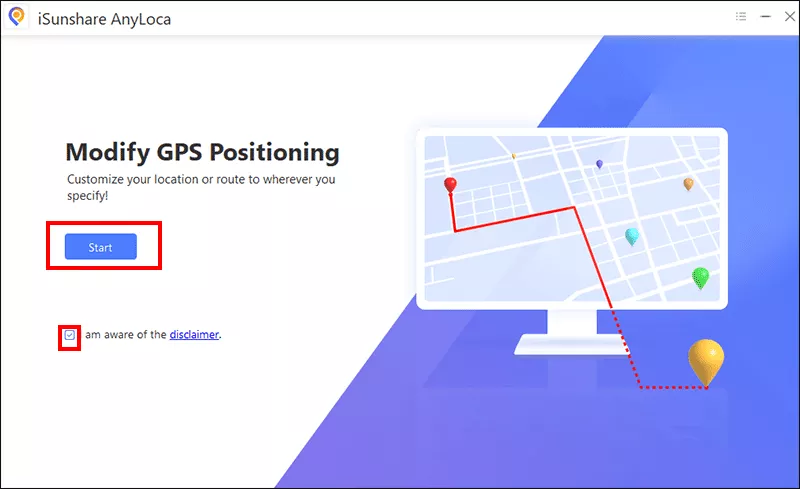
Step 2: In the software, just agree the terms and click the Start button to hatch eggs at home.
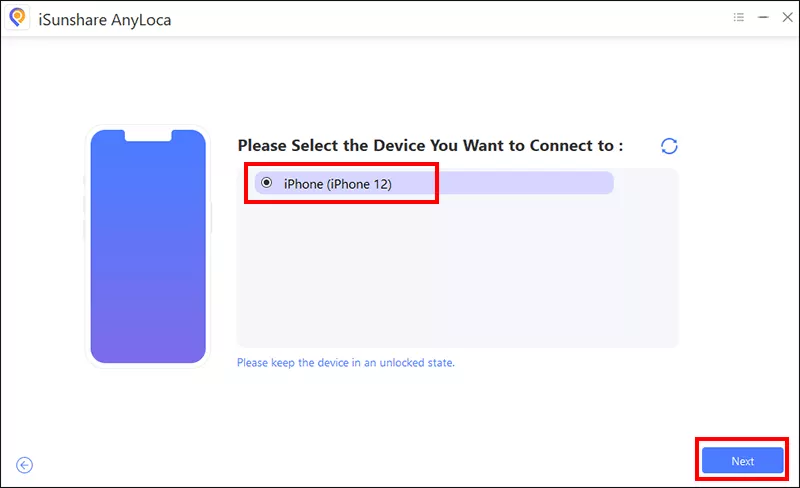
Step 3: As your iPhone is detected, you can see it listed on the menu. Just choose it and hit the Next button to proceed.
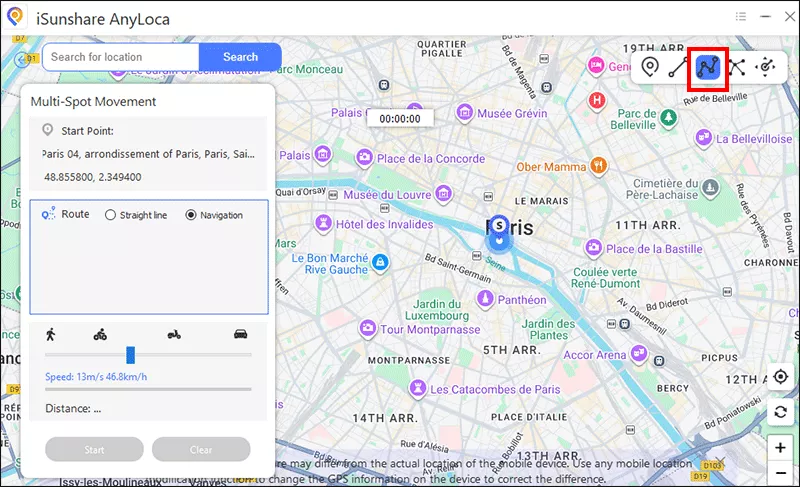
Step 4: When the Map comes, you can see 5 different modes in the top-right corner. You can choose the last four modes to simulate the real walking. From my perspective, the third option: Multi-spot movement is perfect to simulate walking around in a specific area.
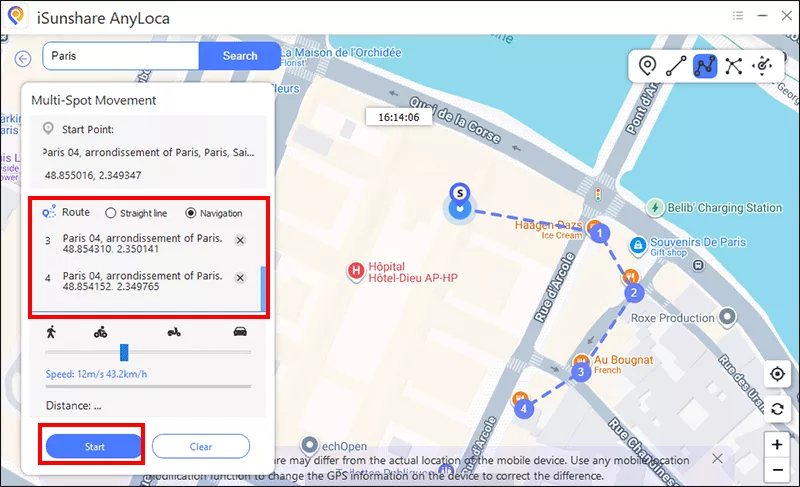
Step 5: Now you can select the route mode and mark the spots on the Map. After that, set the speed for walking. When all is ready, open Pokémon GO and click the Start button to start walking in the selected area, allowing your eggs to hatch.
Method 2: Use Fake GPS (Android Users)
For Android users, Fake GPS is an excellent and simple tool to spoof your GPS location. It lets you set your location and simulate movement without walking, helping you hatch your eggs faster.
How to Use Fake GPS on Android to Play Pokémon GO Without Moving:
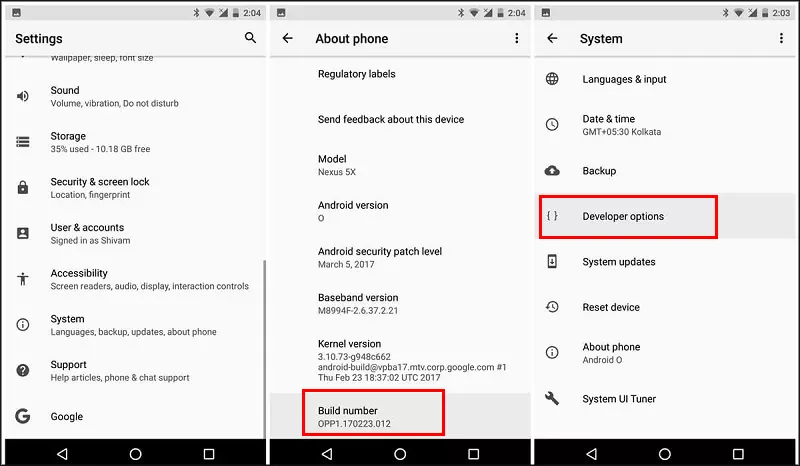
Step 1: Go to Settings > About Phone > Tap Build Number 7 times to enable Developer Options.
Step 2: Download Fake GPS Location from the Google Play Store or use a trusted spoofing app like Mock Locations.
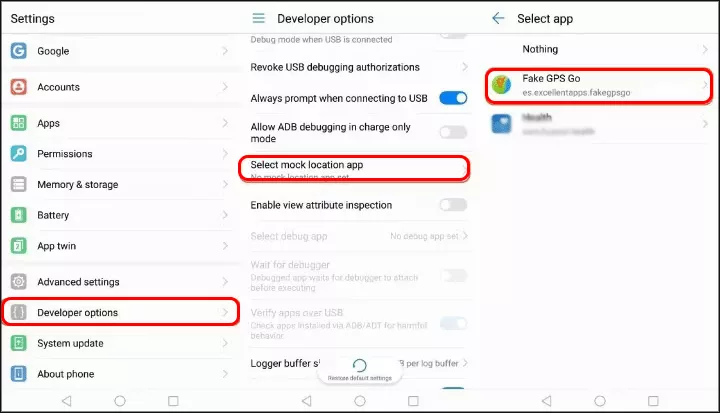
Step 3: In Developer Options, set Fake GPS as the mock location provider.
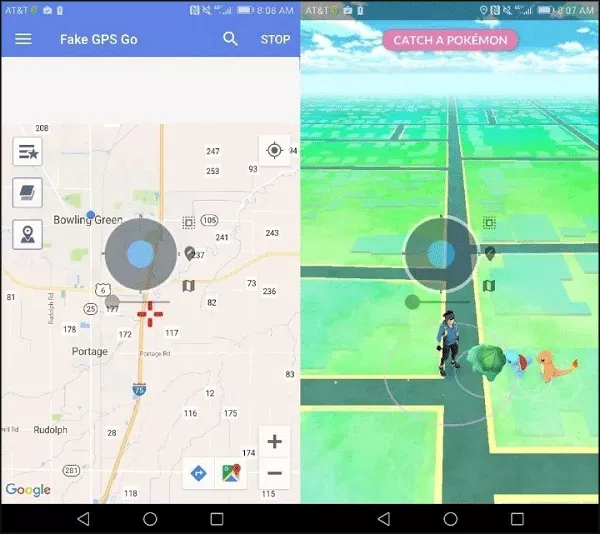
Step 4: Open the Fake GPS app and select the location where you want to simulate walking. Then launch Pokémon GO, and your GPS will show that you're in the selected location, enabling egg hatching.
Method 3: Use the Adventure Sync Feature (Without Moving)
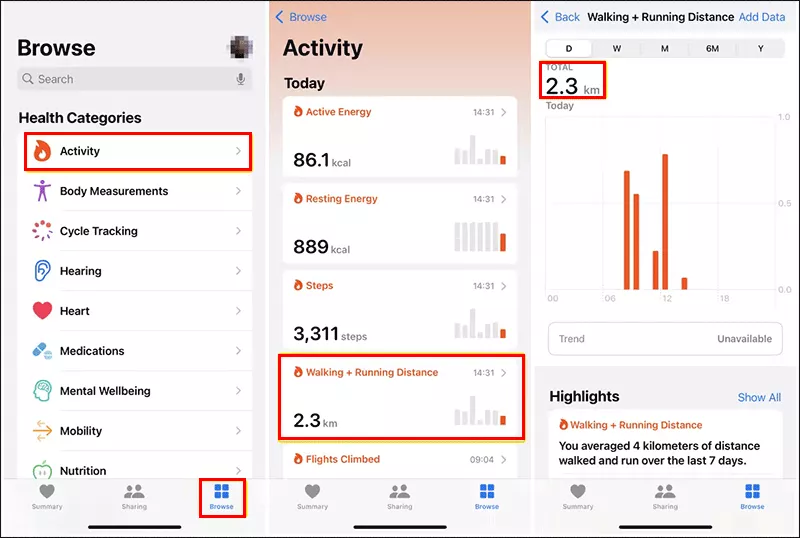
Adventure Sync is a built-in feature of Pokémon GO that tracks your steps, even when the app isn't open. You can hatch eggs by syncing with fitness apps like Google Fit or Apple Health. While this doesn't directly simulate walking, it can help you hatch eggs more efficiently if you do other activities (such as exercising or using a treadmill).
Step 1: Go to Settings in Pokémon GO, find Adventure Sync, and turn it on.
Step 2: Connect Pokémon GO to your Google Fit or Apple Health app.
Step 3: Your steps will be counted even if Pokémon GO is closed, helping you hatch eggs without the game being open all the time.
Method 4: Attach Your Phone to the Moving Objects
If you do not want to use the location spoof app, you can choose a moving object to hatch eggs instead of you. What does it mean a moving object? Many options for your choice: a drone, a robot, or even a dog. You can open Pokémon GO on the phone, and then let them walk a significant distance to catch eggs. But it is important to make sure your phone is safe and pay attention to the distance.
Method 5: Run Your Bike
Do not like walking because it is too tired? A bike will relax you. It is the safest and fastest way to hatch eggs in Pokémon GO. You can keep the riding speed about 6.5mph and the game will regard you are in real walking. It is a good way to hatch eggs without walking.
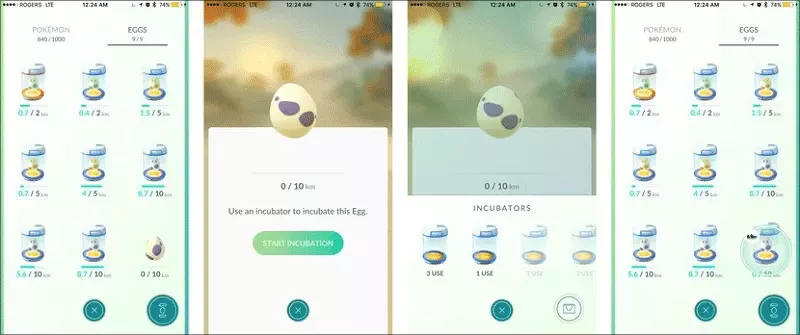
Method 6: Apply Incubators to Hatch Eggs
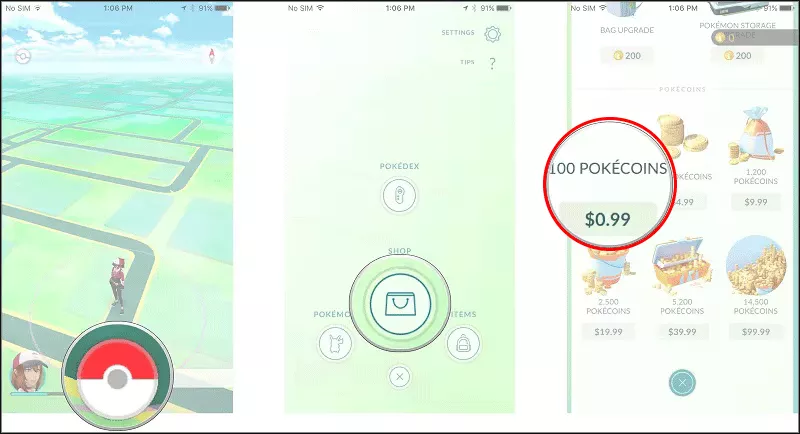
If you want to hatch eggs in Pokémon GO without moving, there is a simplest way to achieve it. Just purchase more incubators to incubate eggs. But you need to have enough Pokecoins.
Step 1: Open Pokémon GO and purchase more Pokecoins. For example, you can get 100 Pokecoins with $0.99.
Step 2: After that, you can open Shop to purchase eggs and incubators.
Step 3: Open your collection and apply incubators to hatch eggs without moving.
FAQs about Pokémon GO Egg Hatching
1. Is there a way to catch Pokémon GO eggs at home?
Yes, you can use the GPS spoofing tool to simulate the movement to get eggs. But it is essential to follow the cooldown rules to avoid ban.
2. Is Adventure Sync necessary to hatch eggs?
No, Adventure Sync isn't required to hatch eggs, but it makes it easier to track your distance, especially when the game isn't open.
3. Can you shake your phone to hatch eggs?
Yes, if Adventure Sync is enable on your phone. The shaking action is similar to the running action on your phone. Thus, it is possible to hatch eggs by shaking your phone.
Conclusions
Hatching eggs in Pokémon GO without walking is entirely possible with the right tools and strategies. Whether you use iSunshare AnyLoca, Fake GPS, or the Adventure Sync feature, you can enjoy the benefits of hatching eggs without having to leave your home. Just remember to spoof safely, follow cooldown rules, and avoid overusing these methods to reduce the risk of being banned.