We use cookies for personalizing content and ads and providing social media features. Your usage information on our website will be used for social media, advertising, and traffic analytics, or shared with our partners. Clicking "Accept" means you agree to use our cookies .
"Is there any reliable way to make the deleted photos unrecoverable in my Windows 10 computer?"
To ensure the deleted files cannot be recovered in your Windows 10 PC, what do you do commonly? Empty the trash bin which is full of the deleted files or even format the drive where stores the useless files? However, both of the simple two ways above can't permanently delete files , such as photos, from your Windows 10 computer, because the deleted files aren't removed securely until the storage space is overwritten, which gives an opportunity to the data recovery software to restore your deleted data.
Luckily, here are trusted methods to securely wipe files so they can't be recovered.
Method 1: Overwrite Deleted Data with Built-in Cipher
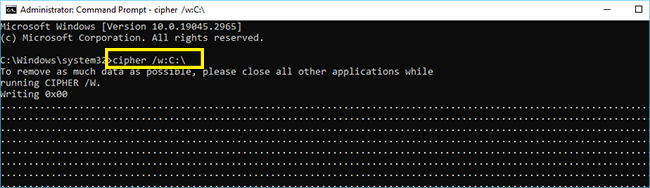
Windows includes a native tool to overwrite deleted data. This overwrites all free space on the drive, eliminating remnants of deleted files. You can run Command Prompt as administrator and run command line: cipher /w:C:\ . (Replace C:\ with other drive or location)
Method 2: Make Deleted Files Unrecoverable with File Shredder
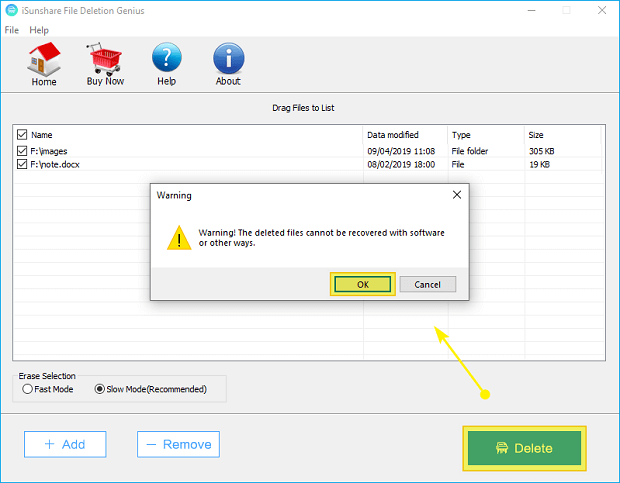
The trusted file shredder tool makes secure deletion easy. iSunshare File Deletion Genius is ideal for selective file/folder deletion, which makes deletion unrecoverable in clicks.
Tips: iSunshare File Deletion Genius also applies to Windows 8/7/Vista/XP.
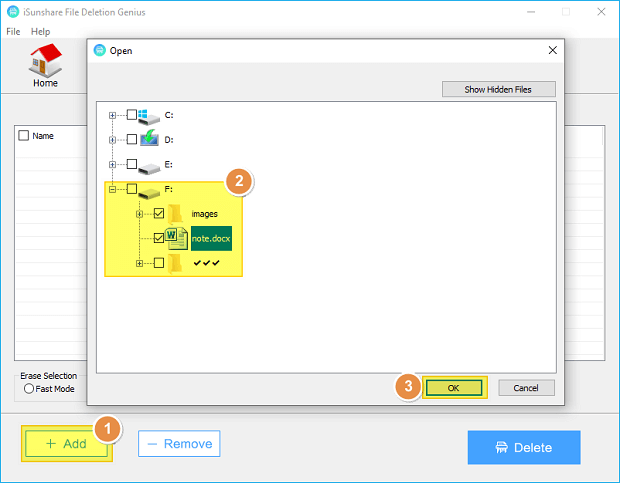
Step 1: Run the software. Click Add to input the files that you want to delete or you can directly drag the files to the user interface. Then hit OK to save your choices.
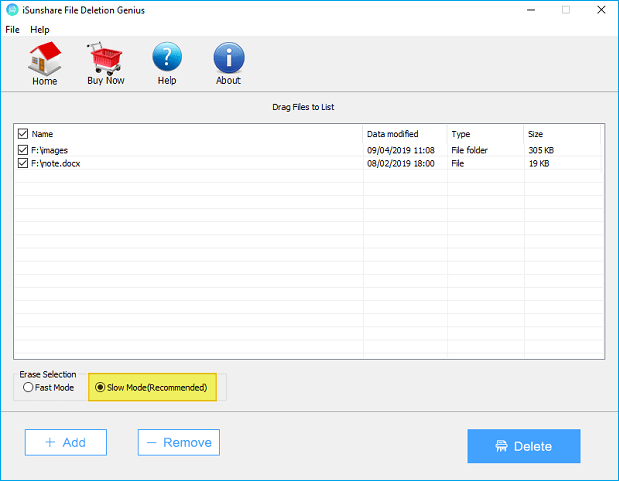
Step 2: Select the deletion mode in the lower-left corner. Although the fast mode can save your time, the slow mode is suggested to be chosen because it can delete your files more completely and cleanly.
Step 3: Hit Delete to begin erasing the files.
At last, with the help of iSunshare File Deletion Genius, your files are deleted permanently and it can be 100% ensured that the deleted files cannot be recovered in your Windows 10 computer. In this way, you can make sure the confidential files are deleted and unrecoverable so that it is no need to worry about the data security.
FAQs on Deleting Files and Making it Unrecoverable
Q1: Does simple delete remove a file permanently?
No—it just removes the reference. It is easily to restore the data before it is overwritten.
Q2: Can I empty the recycle bin to make the deleted files unrecoverable?
After the recycle bin is empties, the files may still be recoverable until space is overwritten. Thus, the secure mode is to use file shredder like iSunshare File Deletion Genius.
Q3: Can I recover files after cipher?
No, it is almost impossible to recover files after it is overwritten by cipher.