By Michael | Last Updated
Turning on media streaming enables you to send your music, videos and pictures to other devices and computers on your network, and also allows you to receive media data from other devices and computers. Consequently, the article illustrates how to turn media streaming on or off in Windows 10 computer.
Step 1: Access Control Panel.
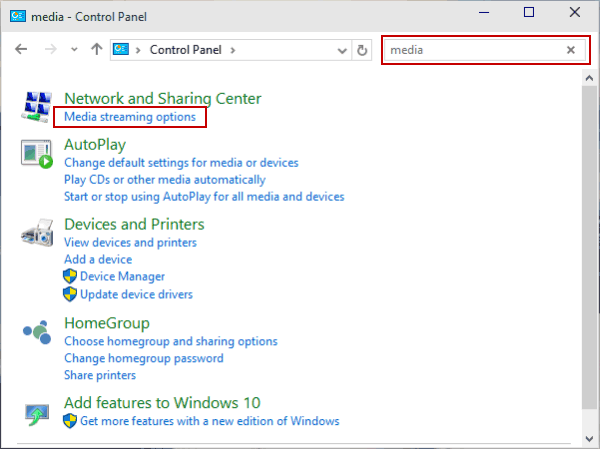
Step 2: Type media in the top-right search box and open Media streaming options from the result.

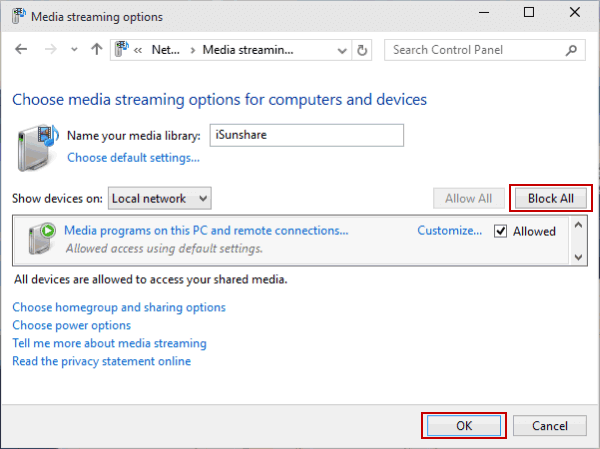
Step 3: Click Turn on media streaming.
Step 4: To Disable Media Streaming, choose Block All and tap OK.

One more tip:
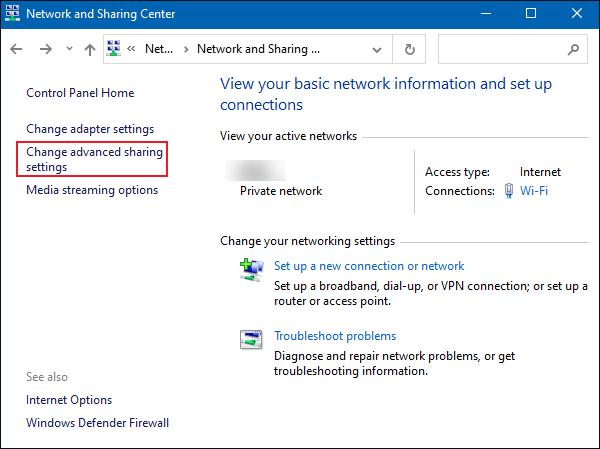
You can also locate the following path in the Control Panel and click Change advanced sharing settings in the left side.
Control Panel\Network and Internet\Network and Sharing Center
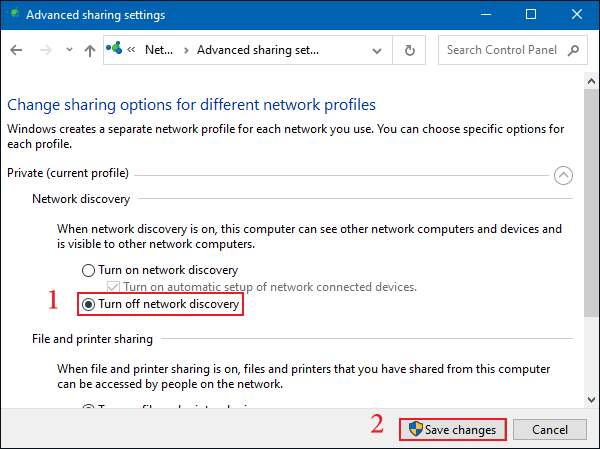
Then select Turn off network discovery, click on Save Changes. This method can also turn off media streaming.

Related Articles:
How to Reset Windows 10 Forgotten Password
How to Bypass Windows 10 Password Login with/without Password
Easy Guide to Reset Windows 10 Admin Password Like an Expert
4 Tips to Change Windows 10 Password without Knowing Current Password
Can't Sign into Microsoft Account Windows 10 | Account Locked/Blocked