By Michael | Last Updated
When you empty Recycle Bin in your Windows 10 PC, how can you know all items are removed without checking whether the Recycle Bin is empty or not? FYI, you can let the system make a sound when emptying Recycle Bin. And this article respectively illustrates how to turn on or off sound when emptying Recycle Bin for your better reference.
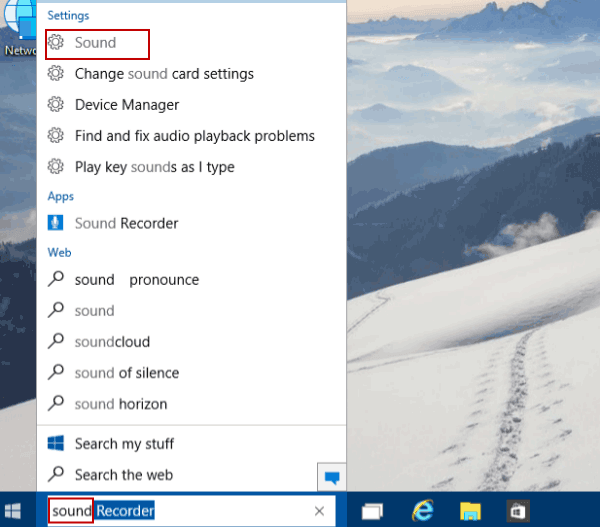
Step 1: Type sound in the search box and tap Sound in the result to open Sound settings. Or you can open Contorl Panel and search Sound.

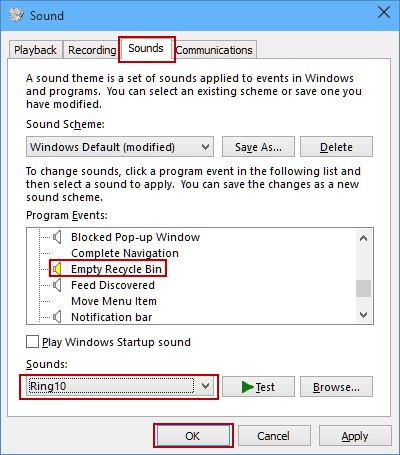
Step 2: In the Sound dialog, open Sounds, choose Empty Recycle Bin in the program events, click the bar under Sounds, select a sound from the pop-up list and then tap OK.

Step 1: Access Sound settings via search.
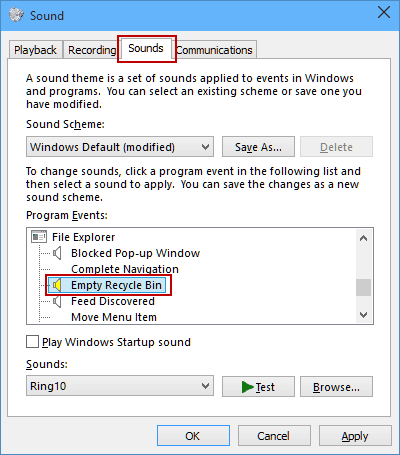
Step 2: In the Sound window, choose Sounds and select Empty Recycle Bin from program events.

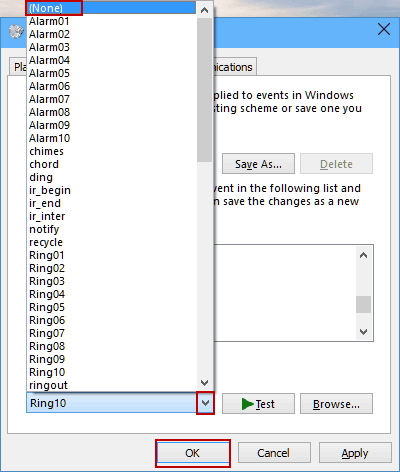
Step 3: Click the down arrow on the bar under Sounds, choose (None) in the list and hit OK.

Related Articles:
How to Reset Windows 10 Forgotten Password
How to Bypass Windows 10 Password Login with/without Password
Easy Guide to Reset Windows 10 Admin Password Like an Expert
4 Tips to Change Windows 10 Password without Knowing Current Password
Can't Sign into Microsoft Account Windows 10 | Account Locked/Blocked