We use cookies for personalizing content and ads and providing social media features. Your usage information on our website will be used for social media, advertising, and traffic analytics, or shared with our partners. Clicking "Accept" means you agree to use our cookies .
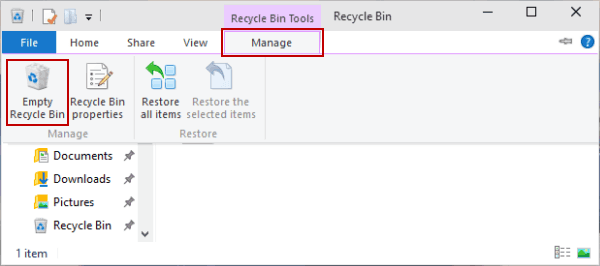
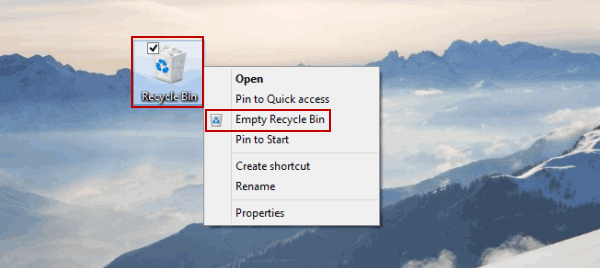
Do you delete all files in the Recycle Bin to empty it on Windows 10 computer? what are two ways to remove all contents of recycle bin in Windows 10. In this article, you can find the quick and easy ways to empty Recycle Bin in Windows 10.
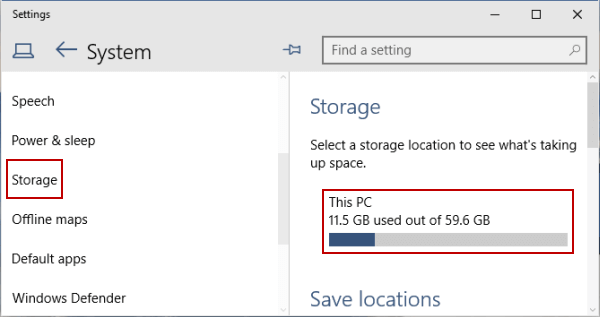
Step 3: Open Storage, and select This PC (or a hard drive) under Storage.
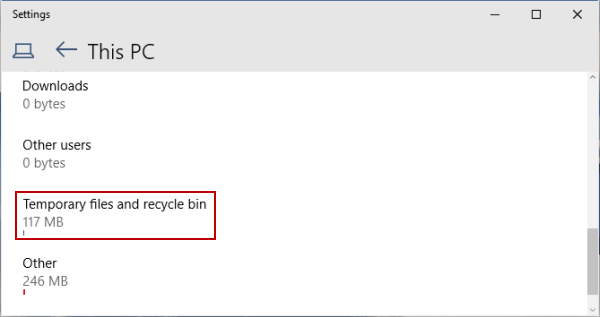
Step 4: Click Temporary files and recycle bin.
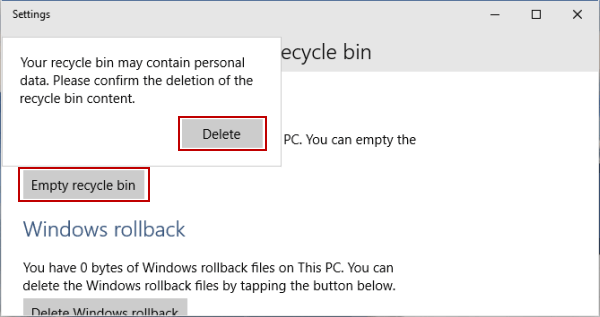
Step 5: Choose Empty recycle bin and tap Delete.
Note:
In the newer Windows 10 version, you can directlt access Settings> System > Storage. Then click Temporary files and check the Recycle bin option. Finally, click the Remove files button.
Way 3: Clean Trash Using Command-Line Tools (CMD or PowerShell)
Step 2: Run the command: rd /s /q C:\$Recycle.Bin . You can replace C: with another drive letter as needed.
Using PowerShell (Admin):
Just launch PowerShell as Admin. Then execute the command line:Clear-RecycleBin -Force .
Tips: Clear Recycle Bin Content with iSunshare System Genius
If you want a quick and safe way to clear content in recycle bin and speed up your computer, iSunshare System Genius can be a good choice. This system cleaner can help to remove junk files from recycle bin in clicks.