We use cookies for personalizing content and ads and providing social media features. Your usage information on our website will be used for social media, advertising, and traffic analytics, or shared with our partners. Clicking "Accept" means you agree to use our cookies .
Phone Dialer (dialer.exe) is a legacy Windows tool that enables you to dial phone numbers using an attached modem. Though rarely used today, it's still available in Windows 10, especially for niche use cases. The following four methods help you quickly open Phone Dialer on Windows 10 computer.
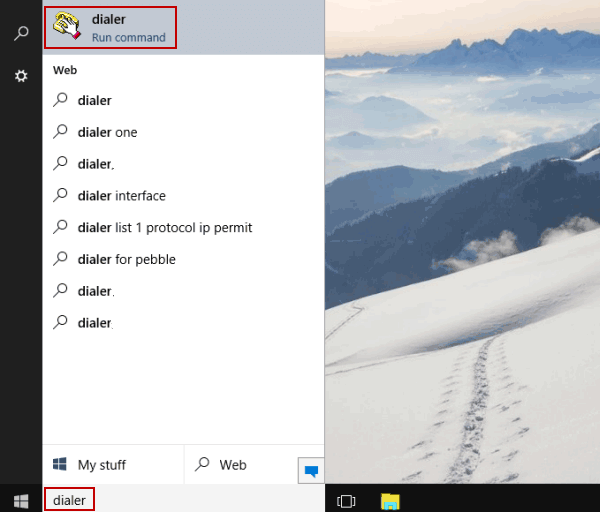
Way 1: Turn Phone Dialer on via searching.
Type dialer in the search box on the bottom left, and choose dialer in the list.
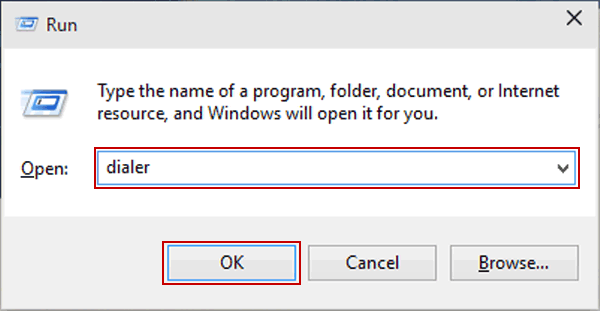
Way 2: Open Phone Dialer through Run.
Press Windows+R to open the Run dialog, input dialer and click OK.
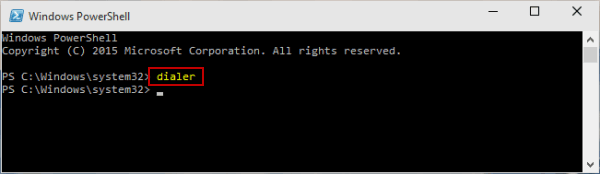
Way 4: Turn Phone Dialer on by Windows PowerShell.
Step 1: Enable Windows PowerShell from Start Menu.
Step 2: Input dialer and tap Enter.
FAQs about Phone Dialer in Windows 10
Q1: What is the Phone Dialer on Windows 10?
It's a legacy tool (dialer.exe) that enables phone dialing through a connected modem—originally popular on older Windows versions.
Q2: Does the Phone Dialer still exist in newer Windows versions like Windows 11?
Yes! Users confirm it still works—though only if a modem is connected.
Q3: Is there a modern equivalent?
For modern phone integrations, use Phone Link (formerly Your Phone), which supports Android or iOS integration and allows making calls from your PC via Bluetooth or Wi-Fi.