By Michael | Last Updated
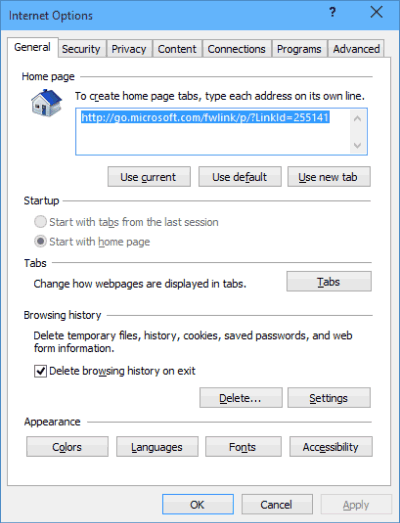
The Internet Options window (also known as Internet Properties) allows you to manage browser settings, security, connections, and more. Here's how to access it quickly using four different methods—choose whichever fits your workflow best. The article summarizes four simple methods to open Windows 10 Internet Options (or Internet Properties).

Open Settings and then search Internet Option in the search box. Soon, you can access the Internet Options window.

Press Win +R to get the Run dialog. After that, input inetcpl.cpl and Internet Propterties dialog appears immediately.

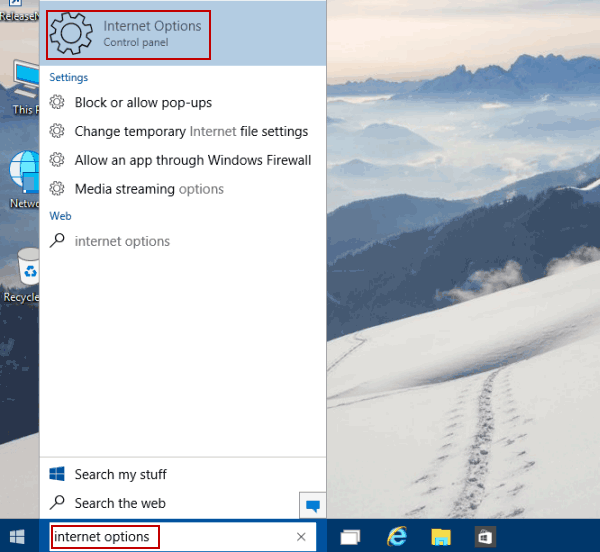
Type internet options in the search box on taskbar and choose Internet Options in the result.

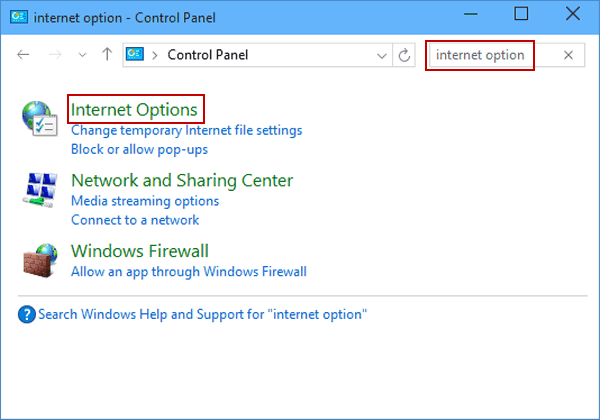
Enter Control Panel, type internet option in the top-right search box and tap Internet Options in the items.

Related Articles:
How to Reset Windows 10 Forgotten Password
How to Bypass Windows 10 Password Login with/without Password
Easy Guide to Reset Windows 10 Admin Password Like an Expert
4 Tips to Change Windows 10 Password without Knowing Current Password
Can't Sign into Microsoft Account Windows 10 | Account Locked/Blocked