We use cookies for personalizing content and ads and providing social media features. Your usage information on our website will be used for social media, advertising, and traffic analytics, or shared with our partners. Clicking "Accept" means you agree to use our cookies .
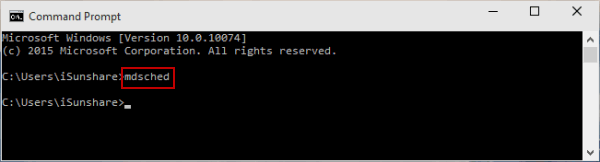
When your PC freezes, crashes, or throws BSODs, faulty RAM might be the cause. There is the built-in memory checker in your Windows 10 computer-- Windows Memory Diagnostic, which can help test memory modules. With the following five methods, you can quickly open Windows Memory Diagnostic on Windows 10 computer.
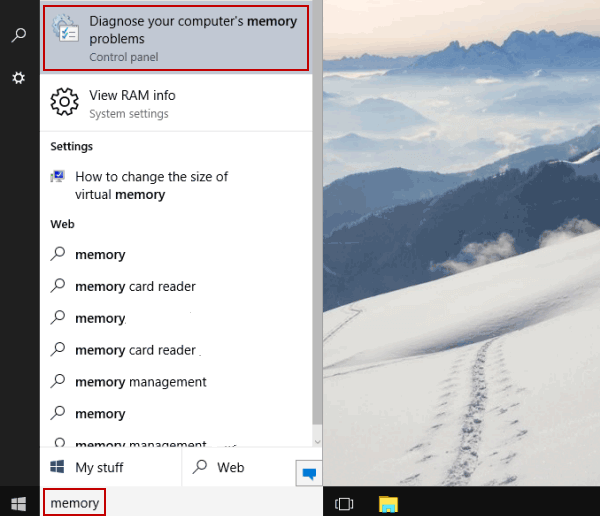
Way 1: Open Windows Memory Diagnostic by searching.
Input memory in the bottom-left search box on desktop, and choose Diagnose your computer's memory problems.
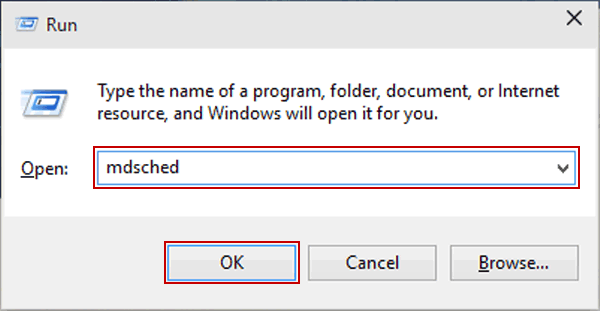
Way 2: Turn Windows Memory Diagnostic on through Run.
Display Run using Windows+R, type mdsched and tap OK.
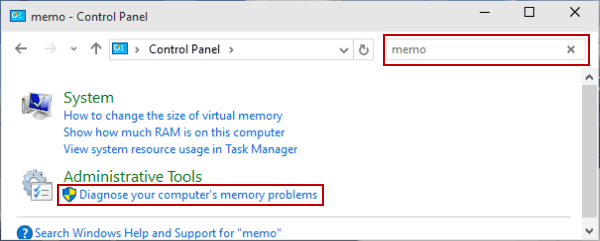
Way 3: Open Windows Memory Diagnostic in Control Panel.
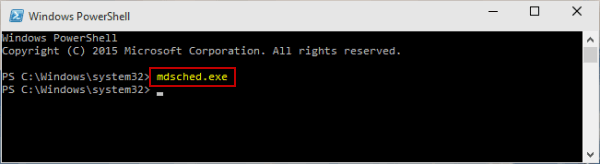
Way 5: Open Windows Memory Diagnostic via Windows PowerShell.
Step 1: Get into Windows PowerShell from Start Menu.
Step 2: Input mdsched.exe and hit Enter.
Tips: Quickly Open Windows Memory Diagnostic via Shortcut
First of all, we can create a shortcut for Windows Memory Diagnostic if you need to use this tool frequently.
Step 1: Right-tap the empty space on the desktop, point at New in the menu and choose Shortcut.
Step 2: Enter %windir%\system32\mdsched.exe and select Next in the window.
Step 3: Type Windows Memory Diagnostic to name the shortcut, and hit Finish to create it.
After that, you can double-click this shortcut on the desktop to use Windows Memory Diagnostic tool.
FAQs on Windows Memory Diagnostic in Windows 10
1. If Windows won't boot, how to run Windows Memory Diagnostic?
You can boot into Advanced Options via recovery media or failed boots. Then open Command Prompt and run mdsched.exe. The tool runs before Windows loads. Alternatively, some BIOS/UEFI menus have a built-in memory diagnostic utility. You can access the BIOS settings to open Memory Diagnostic.
2. How long does the diagnostic test take?
It varies in different AM sizes and test depth: Basic takes a few minutes; Standard around 20–30 minutes. Multiple passes on large RAM can take hours.
3. What if the tool crashes or results don't show?
Try running it again, check Event Viewer filter settings, or boot from recovery media. Reddit users suggest MemTest86 as a reliable alternative.