logo
Windows 10 Add Settings to Taskbar in Windows 10

Add Settings to Taskbar in Windows 10

By Sophia | Last Updated

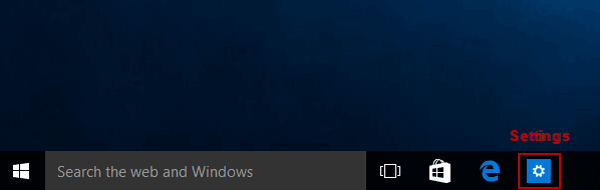
Tired of digging through menus to access Windows Settings? The article introduces how to quickly pin Settings to taskbar on Windows 10 computer, as shown in the following picture.

settings on taskbar

Method 1: Pin from the Start Menu

Step 1: Open Start Menu.

Step 2: Right-click Settings, and select More > Pin to taskbar in the menu.

pin settings to taskbar from start menu

Tip: To remove it from the taskbar, please find the solutions in 2 Ways to Unpin Programs from Taskbar in Windows 10.

Method 2: Pin While Settings Is Open

Step 1: Open Settings.

Step 2: In the taskbar, right-click the Settings icon.

Step 3: Choose Pin to taskbar.

This method works if you already have Settings open and want to lock it to the taskbar.

pin settings to taskbar while opened

Related Articles: