We use cookies for personalizing content and ads and providing social media features. Your usage information on our website will be used for social media, advertising, and traffic analytics, or shared with our partners. Clicking "Accept" means you agree to use our cookies .
"The Pin to taskbar option disappears from the context menu when I right-click a built-in program (e.g. Notepad) on Windows 10 computer. Can you tell me what the reason is?"
If you cannot pin programs to the taskbar in Windows 10, or the "Pin to Taskbar" option is missing or greyed out, don't worry—you're not alone. This issue usually happens after a system update, incorrect settings, or registry problems. In this guide, you'll learn why this happens and how to fix it step by step.
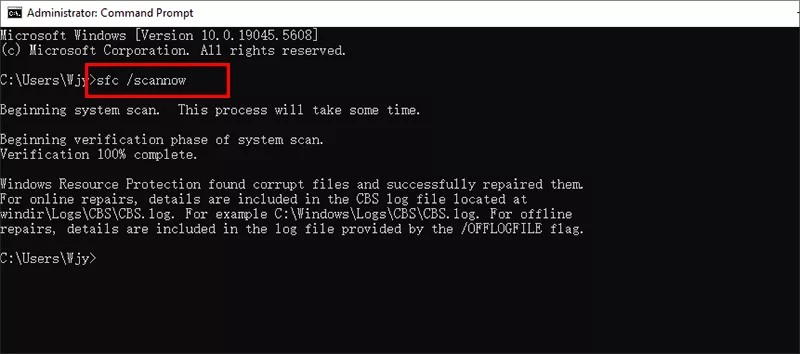
Step 3: Wait for the scan to finish. It will automatically repair damaged system files.
FAQs on Pin to Taskbar not Working
1. Why is "Pin to Taskbar" missing in Windows 10?
It may be disabled in Group Policy, removed from the registry, or blocked by corrupted shortcuts.
2. Can I pin all apps to the taskbar?
No. Some system apps like Recycle Bin or This PC cannot be pinned directly.
3. Does this issue happen after Windows updates?
Yes, updates sometimes reset registry values or corrupt shortcut files, causing this error.
Conclusion
With these fixes, you should now be able to pin any program to the Windows 10 taskbar again. If you still cannot solve the cannot pin to taskbar issue, you can try to perform a system restore on the Windows 10.