By Achilles Hill | Last Updated
The Programs and Features utility in Windows 10 allows users to uninstall, change, or repair installed applications. Accessing this tool can be accomplished through various methods. Below are seven effective ways to open Programs and Features
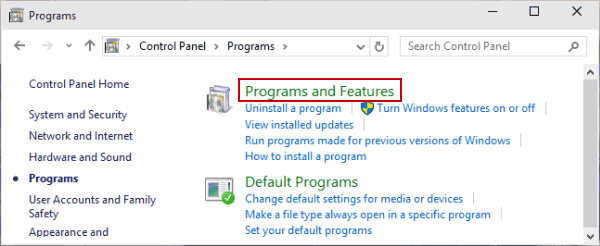
Step 1: Access Control Panel.
Step 2: Select Programs and click Programs and Features.

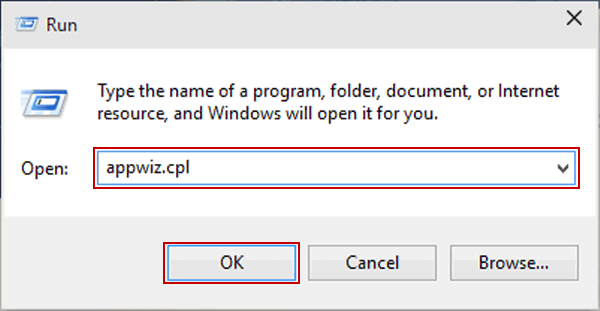
Use Windows+R to display Run, input appwiz.cpl and tap OK.

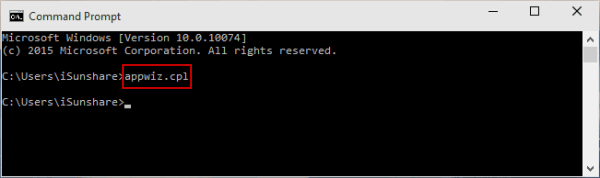
Step 1: Launch Command Prompt.
Step 2: Type appwiz.cpl and press Enter.

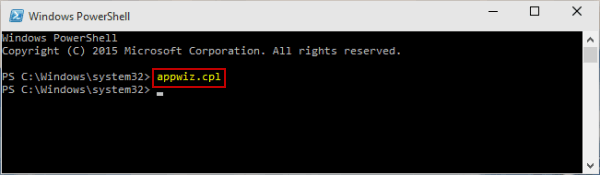
Step 1: Get into Start Menu and start Windows PowerShell.
Step 2: Input appwiz.cpl and hit Enter.

Step 1: Open File Explorer.
Step 2: Navigate to C:\Windows\System32.
Step 3: Locate and double-click on appwiz.cpl.

Related Articles:
How to Reset Windows 10 Forgotten Password
How to Bypass Windows 10 Password Login with/without Password
Easy Guide to Reset Windows 10 Admin Password Like an Expert
4 Tips to Change Windows 10 Password without Knowing Current Password
Can't Sign into Microsoft Account Windows 10 | Account Locked/Blocked