We use cookies for personalizing content and ads and providing social media features. Your usage information on our website will be used for social media, advertising, and traffic analytics, or shared with our partners. Clicking "Accept" means you agree to use our cookies .
Monster Hunter Now is an incredibly fun game, but the experience can quickly turn frustrating for those living in rural areas or with limited mobility. While players in cities are surrounded by monsters, you may be left staring at a nearly empty map.
One potential solution is GPS spoofing, yet the risk of being banned stops most players from even attempting it. This guide cuts through the confusion and shows you how to safely spoof your location in Monster Hunter Now on iPhone. You’ll learn how to choose the right tool, follow cooldown rules, and understand exactly what activates Niantic’s anti-cheat detection system.
With so many GPS spoofing apps online, how can you pick a safe one? As Niantic’s anti-cheat doesn’t just check your coordinates, you can check the following signals to choose the right spoofer:
1. GPS Stability
Genuine GPS signals naturally experience small fluctuations, referred to as “GPS drift.” Inferior spoofing devices produce a perfectly steady, motionless signal, making it an obvious warning sign.
2. Movement Speed
The game tracks both your speed and acceleration. Moving from New York to Tokyo in just one second defies physical laws and can be instantly identified. Similarly, excessively fast joystick inputs will also activate warning mechanisms.
3. Location History
The system maintains a log of your recent positional coordinates. If your location shift from one city to another continent in the span of just 10 minutes, such a logical discrepancy will result in your account being flagged for manual review.
To summarize: Successful spoofing relies on tools capable of simulating natural movement patterns and plausible travel times, rather than arbitrary teleportation.
Safer Method: PC-Based Spoofing Software
PC-based tools offer joystick-style controls and customizable route simulation, enabling you to replicate natural walking patterns—an essential feature for staying undetected. Here, iSunshare AnyLoca is highly recommended for both Windows and Mac users to spoof location on iPhone.
Step 1: Get iSunshare AnyLoca on your Windows or Mac computer. Also, connect your iPhone to the computer. You should make sure all location-based apps are closed before you move forward.
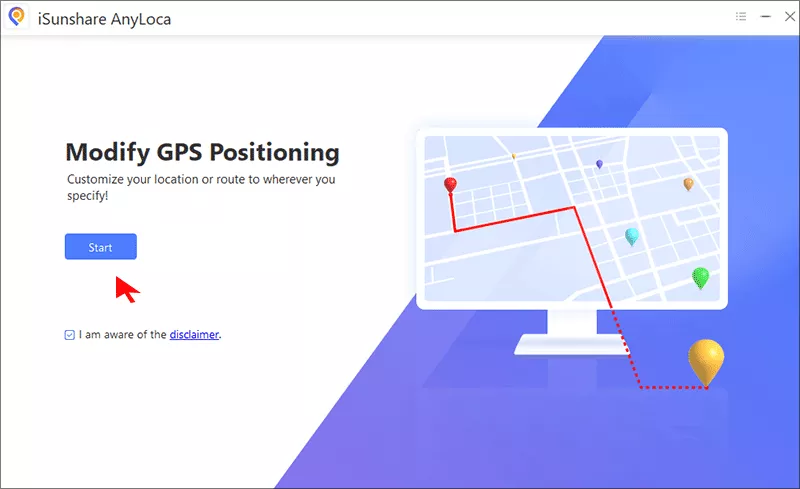
Step 2: Click the Start button and select your iPhone to continue.
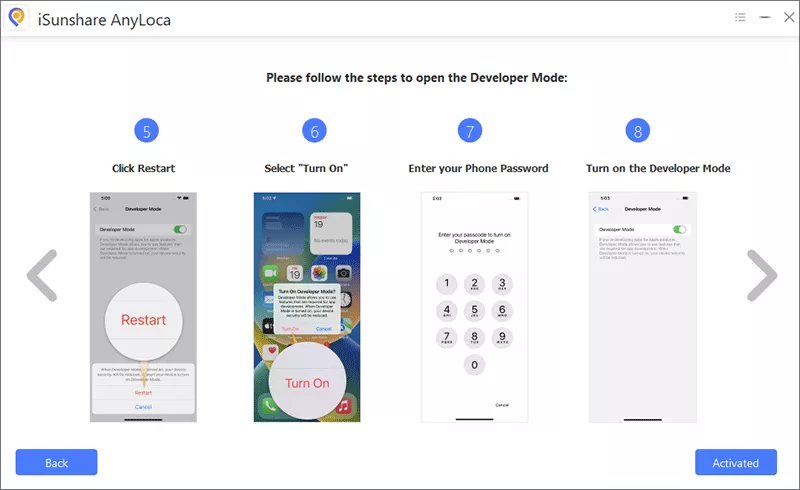
Step 3: Follow the on-screen instructions to open developer mode on your iPhone.
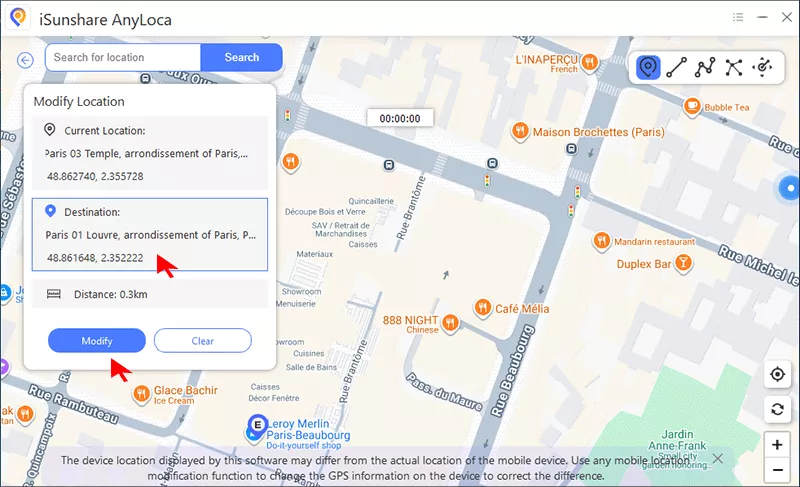
Step 4: Soon, a map appears on your software. Just pick your desired hunting location on the Map and set it as the destination. Then, hit the Modify button to make it as your new location.
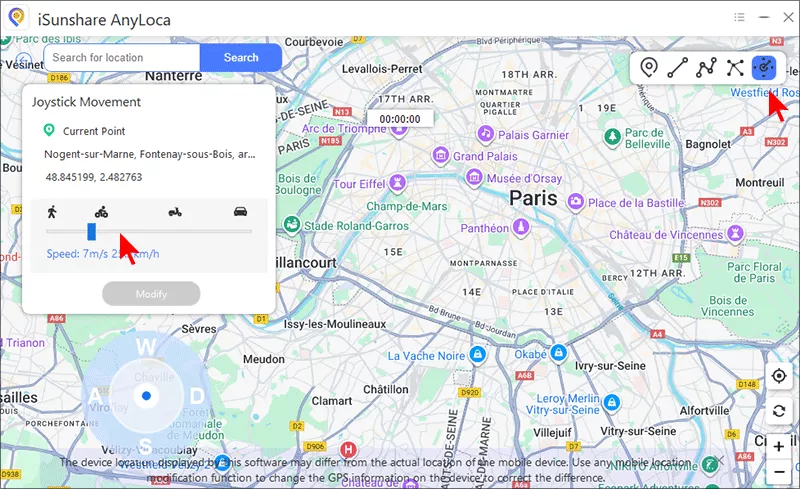
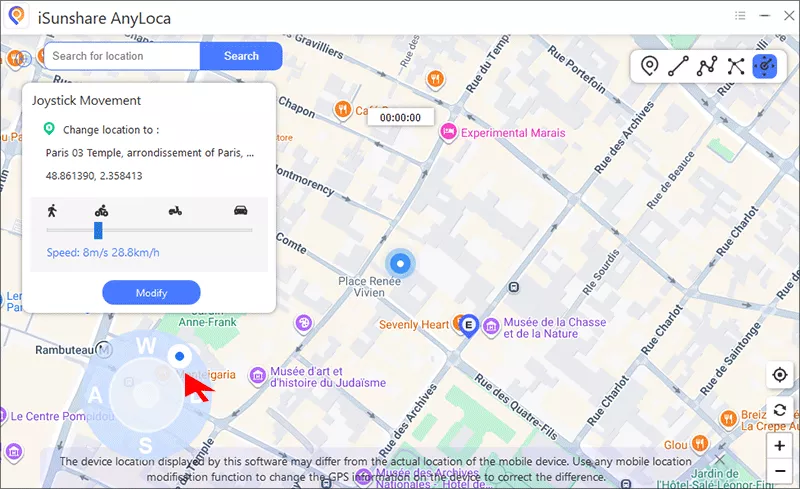
Step 5: After the new location is set successfully, you can choose the Joystick mode on the top right corner. Now adjust the walking speed to a realistic movement speed: 3-6kn/h.
Step 6: Open Monster Hunter Now on your iPhone. Then use the joystick on the software to adjust the directions and navigate to hunt monsters.
Monster Hunter Now GPS Spoofing Safety Rules
For safer spoofing, you should follow the below rules:
Rule 1: Respect Cooldown Times
After in-game actions, such as fighting monsters, gathering resources, spinning nodes, stop moving and cooldown for realistic travel times. When the cooldown times pass, you can teleport to another location.
Rule 2: Mimic Human Movement
You should make the moving patterns naturally: no perfectly straight lines and no constant speed for hours. The joystick plays an essential role in turning at intersections, switching speed between slow walking and light jogging, traveling along actual roads and paths shown on the map.
Rule 3: Avoid Instant Sniping
It is easy to get flagged when you jump across continents to hunt a specific monster and then immediately return. If you teleport to a location like Paris, just do it as your real travel, stay for hours or even days.
Rule 4: Don’t Be Greedy
Rare monsters and tons of resources attract everyone. If you are addicted to hunting then, soon, the spoofing will attract attention. Thus, change your hunting location from time to time and take breaks.
FAQs on Monster Hunter Now Spoofing
Q1: Can you spoof Monster Hunter Now without getting banned?
No method is completely safe. But the PC-based software will make the risk lower with realistic movement and cooldown times.
Q2: Can I use a VPN instead of a GPS Spoofer in iPhone?
No. The VPN cannot change your GPS location, which Monster Hunter Now use to determine location.
Q3: What to do if you see the in-game warning message?
When you receive the warning, stop all spoofing activity and clear you game caches. If possible, reinstall the game. Then, play the game legitimately for months.
Conclusions
There is no 100% safe way to spoof your location in Monster Hunter Now. But you can lower the risk with the reliable PC-based iOS location spoofer. iSunshare AnyLoca is one of such apps that can help you to spoof iOS locations. Is spoofing worth the risk? Only you can answer that.