We use cookies for personalizing content and ads and providing social media features. Your usage information on our website will be used for social media, advertising, and traffic analytics, or shared with our partners. Clicking "Accept" means you agree to use our cookies .
If you're looking to change your location in Pokémon GO to catch region-specific Pokémon, participate in distant events, or just to explore the game from the comfort of your home, there are methods to spoof your GPS location. In this guide, we'll walk you through the safest and most effective ways to change your location in Pokémon GO on iPhone.
Changing your location in Pokémon GO can provide several advantages:
Catch Rare and Region-Specific Pokémon: Many Pokémons are only available in certain regions of the world. Spoofing your location allows you to catch these Pokémon, regardless of where you are physically located.
Access Distant Events: Some in-game events and challenges are only available in specific locations. Changing your location helps you participate in these events without having to travel.
Explore New Areas: If you're looking to visit different gyms, PokéStops, or catch a variety of Pokémon, spoofing your location lets you explore new areas virtually.
Complete Tasks and Research Faster: Many tasks require you to be in specific places. Spoofing helps you complete these tasks quickly by bypassing location restrictions.
Method 1: Change Your Location in Pokémon GO with iSunshare AnyLoca
iSunshare AnyLoca is a popular location-spoofing tool that works seamlessly with iPhones. This tool allows you to change your GPS location without jailbreaking your phone. It's a reliable, user-friendly app that lets you spoof your location on Pokémon GO and many other apps.
iSunshare Reliable iOS Location Spoofer
Safely Teleport with cooldown timer every time you jump.
Step 1: Go to the iSunshare AnyLoca website and download the software on your computer (compatible with both Windows and macOS).
Step 2: Launch iSunshare AnyLoca and connect your iPhone to your computer using a USB cable.
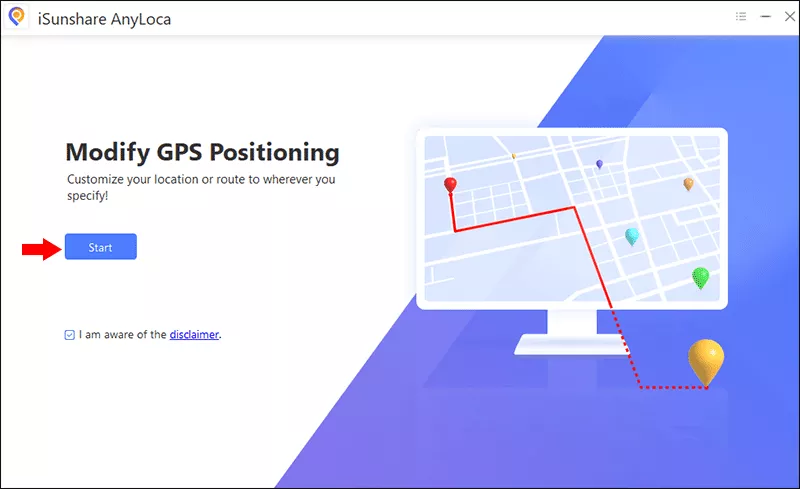
Step 3: Click the Start button on the home interface. After that, you can see your iPhone is listed. Choose your iPhone and click the Next button on the lower right corner.
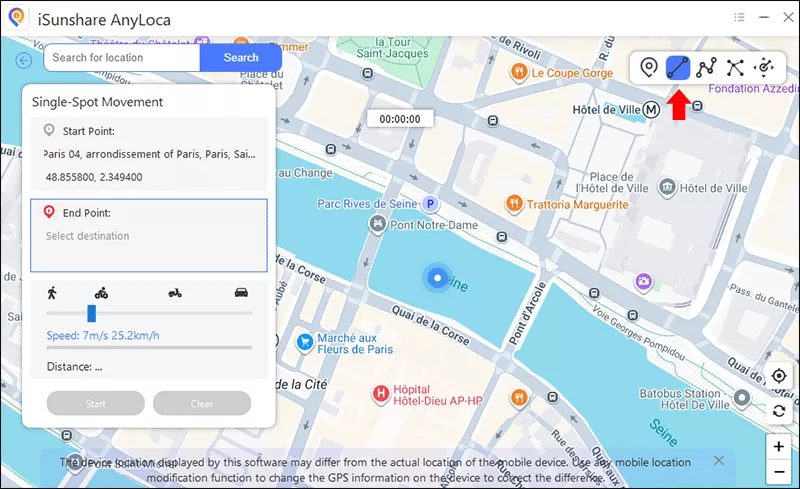
Step 4: Select the teleport mode from the top right corner of the map. Four modes are provided for your choices. Here the Single-Spot mode is set as an example.
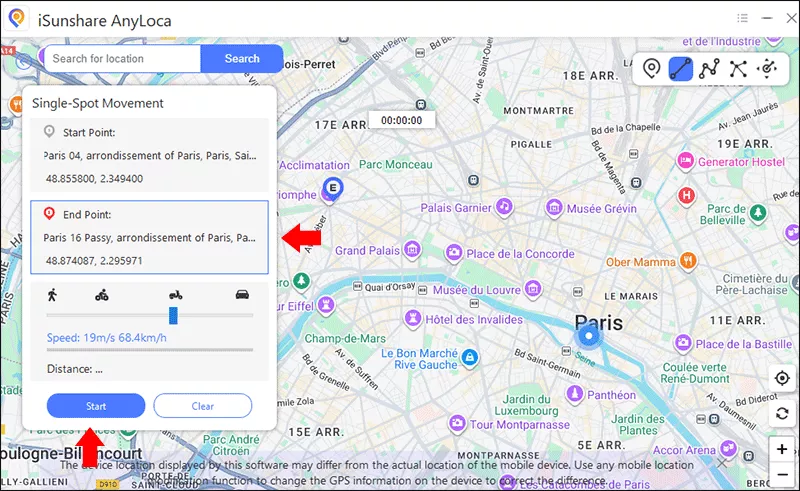
Step 5: Find a location you want to teleport to in the Map(for example, a region with rare Pokémon or an event location).
Step 6: Once you've selected your destination, click the Start button. After the process ends, your iPhone will think it's in the new location.
Step 7: Launch Pokémon GO on your iPhone. The app will now show your new, spoofed location. Your device will act as if it's in the location you've selected. You can catch Pokémon, visit PokéStops, and participate in gym battles, all from the comfort of your home or anywhere you choose.
Method 2: Spoof on Pokémon GO by VPN
While a VPN (Virtual Private Network) can't change your physical GPS location, it allows you to spoof your IP address, making it appears as though you're accessing Pokémon GO from another country. This can be helpful for accessing region-locked events or content but doesn't affect GPS location in the game.
Step 1: Get a reputable VPN app such as ExpressVPN, NordVPN, or CyberGhost on your iPhone.
Step 2: Choose a server in your desired region. For example, if you want to access a Japanese event, connect to a Japanese server.
Step 3: When your iPhone successfully links to the VPN, your IP will be changed. But your GPS location will remain unchanged.
After that, you will appear to be in a different region for IP-based location services, allowing you to access content available in that region. Your GPS will remain as it is, so this method is best used in combination with other GPS-spoofing tools.
FAQ on How to Change Location in Pokémon GO
1. Can I change my location in Pokémon GO without getting banned?
Changing your location in Pokémon GO violates Niantic's Terms of Service. While occasional location spoofing might not immediately result in a ban, excessive or suspicious activity can lead to account bans or suspensions. It's always best to use caution and spoof your location sparingly.
2. How can i spoof Pokémon GO on iPhone?
The above two methods can help you easily spoof Pokémon GO on iPhone. iSunshare AnyLoca is the recommended method, you can use it responsibly and avoid excessive location changes.
3. Will using a VPN affect my Pokémon GO location?
A VPN can change your IP address, allowing you to access region-locked content, but it will not change your GPS location. To spoof your GPS, you need to use a location-spoofing tool alongside a VPN.
Conclusions
Changing your location in Pokémon GO can unlock new possibilities in the game, from catching rare Pokémon to participating in distant events. Whether you're using a trusted tool like iSunshare AnyLoca for iPhone or VPN, it is easy to modify your in-game location. Always remember, however, that spoofing violates the game's terms of service, and overuse could result in penalties. Spoof responsibly and enjoy your adventure in the world of Pokémon GO!